Project management in Claude, ChatGPT and Copilot
Your AI assistant is only as good as the plan it reads. Empwr keeps your team's project plan current from meetings, tickets and docs, then hands it to the assistant you already use.
AI chat and MCP access included. 30-day free trial, no credit card.



Two risks are open on the Q1 Launch project:
Launch emails. Legal asked for changes in Tuesday's launch sync, so the Thursday send date may move.
Feature build. The build ticket is still in review, two days past its due date.
Trusted by product-driven brands

























Your AI assistant sees one chat. With Empwr, it sees the whole project.
On its own, an AI assistant knows what's in the conversation and the files you give it. Connect Empwr and it can see your team's whole project: status, risks, decisions and follow-ups, drawn from your meetings, tickets and documents and updated every hour.
Set up in three steps
One Empwr connection works in Claude, ChatGPT and Microsoft Copilot.
Start a free trial
Create your Empwr account and your first project. No credit card.
Connect your meetings and tools
Connect your calendar, meetings, tickets, chat and docs. Empwr builds the project plan from what happens there.
Add Empwr to your assistant
Connect Empwr from Claude's Connectors Directory, add it as a custom connector in ChatGPT, or add it as a tool in a Copilot Studio agent. Approve access and you're connected.
Ask about your project the way you'd ask a teammate
Your assistant pulls fresh context from Empwr every time you ask.
“What's blocked this week?”
Open risks and blockers across the project, pulled from your meetings, tickets and chat.
“What changed since Monday's standup?”
Decisions, new action items and moved dates since that meeting.
“Draft my status update for the steering meeting.”
A draft built from the current project plan, ready for you to edit and send.
“Who owns the open actions from yesterday's review?”
Each open action item from that meeting, with its owner and due date.
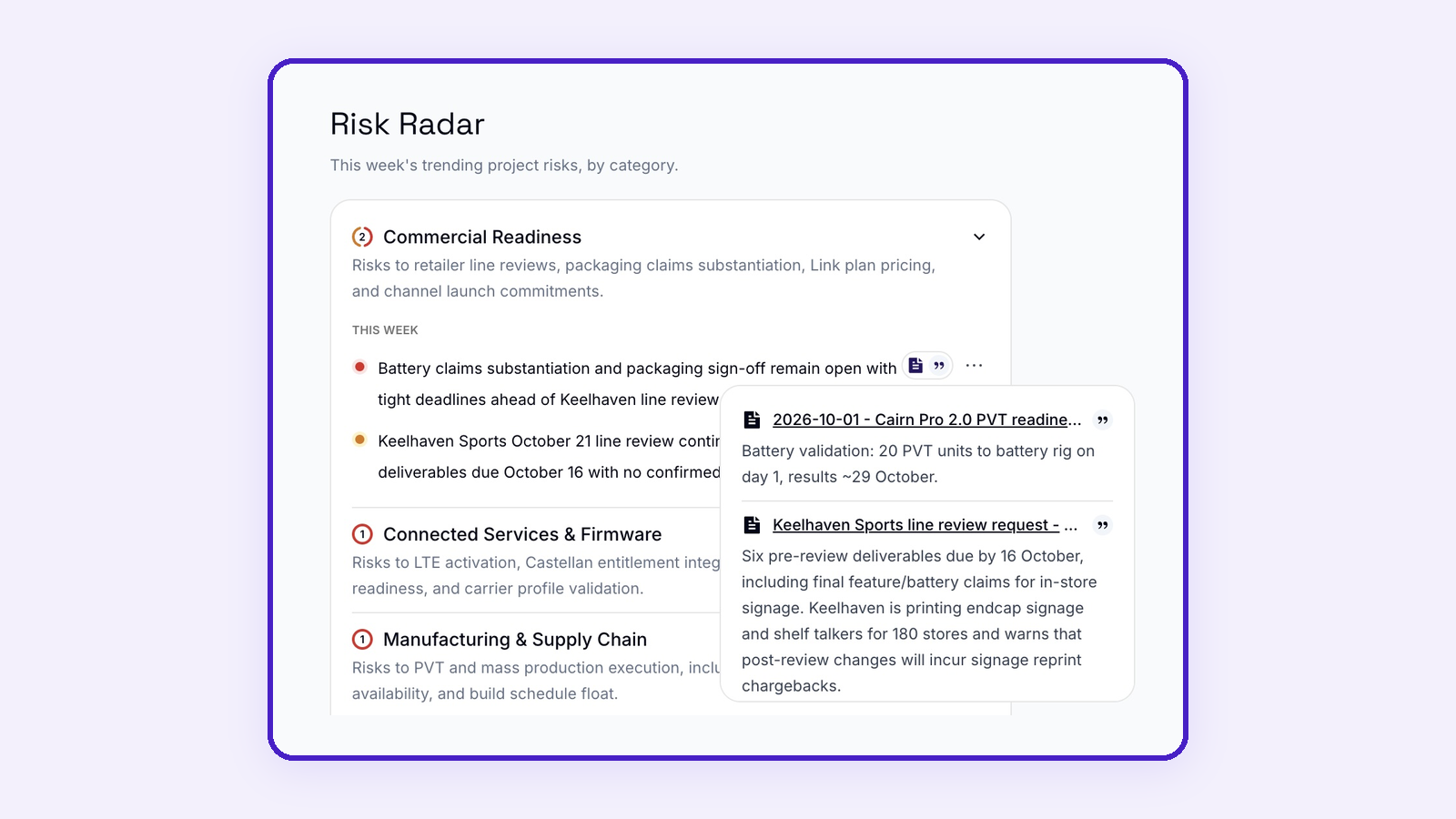
Answers backed by evidence you can check
Answers come from Empwr's project plan, built from what actually happened, not from what was pasted into the chat. Every risk and decision links to the meeting, ticket or document behind it, so anyone can check. Need a change? Ask the assistant to create, assign or close a task right from the chat.
Built for teams, not one person's chat
Empwr holds project memory per project, not per person. Everyone on the team, and every teammate's assistant, works from the same plan. When someone hands a project over, the next person starts with the full story.

One picture across every vendor's tools
Your project doesn't live in one vendor's suite. It lives in Jira, Linear, GitHub, Slack, Teams, SharePoint, Confluence and a stack of meetings. Most AI only reads its own vendor's data. Empwr reads across all of them, so the assistant you ask sees the whole program, not one vendor's slice of it.
Built by people from Microsoft Project and Atlassian
Empwr's CEO and CPO spent a combined 35 years working on Microsoft Project and Atlassian.
Security
SOC 2 Type 2 attestation, Security / Common Criteria scope. Your data is not used to train AI models without your prior written consent.
Pricing
30-day free trial of the full product. After that, Personal is free forever and includes AI chat and MCP access. Team is $19 per user/month, billed annually.
See pricing →Using Empwr from your AI assistant: questions, answered
Can AI assistants like Claude or ChatGPT manage projects?
Not on their own. An AI assistant knows what's in the chat and the files you give it, not the live state of your projects. Connected to a project tool like Empwr through MCP, Claude, ChatGPT or Copilot can report status, risks and owners across your team's projects, and create or update tasks when you ask.
What is an MCP server?
MCP (Model Context Protocol) is an open standard that lets AI assistants connect securely to other apps. An MCP server, like Empwr's, gives an assistant such as Claude, ChatGPT or Microsoft Copilot access to that app's data, so it answers from real information and, if you allow it, can take actions in the app.
How do I use Claude or ChatGPT for project management?
Connect the assistant to a tool that keeps your project plan current. With Empwr connected, you can ask Claude or ChatGPT where a project stands, what's blocked or who owns the open actions, and have it create or assign tasks. Empwr builds the plan from your team's meetings, tickets and documents.
Which AI assistants does Empwr work with?
Empwr works with Claude (web, desktop, mobile and Claude Code), ChatGPT, OpenAI Codex and Microsoft Copilot through Copilot Studio agents. All of them connect to the same Empwr MCP server.
Do I need a paid Claude or ChatGPT plan?
Empwr's AI chat and MCP access are included on every Empwr plan, including the free one. Requirements on the assistant side vary: ChatGPT supports custom connectors on eligible paid plans, Copilot connects through Copilot Studio, and on Claude Team and Enterprise plans an Owner adds Empwr for the organization first.
Can I update the project plan from chat?
Yes. With write access, your assistant can create and assign tasks, change due dates, mark tasks complete and resolve risks in Empwr. Status changes also update linked Jira, Linear and GitHub tickets. The assistant can't delete projects, meetings or tasks.
Can the assistant see projects I can't?
No. The assistant acts as you. It sees and changes only what you can see and change in Empwr, and its changes are recorded under your name.
How does Empwr work with Microsoft Copilot?
Empwr connects to Microsoft Copilot through a Copilot Studio agent. Add Empwr's MCP server as a tool in the agent, publish the agent to Microsoft 365 Chat and Teams, and ask about your projects there.
How much does Empwr cost?
Every account starts with a 30-day free trial of the full product, with no credit card. After that, Personal is free (1 project, up to 3 members), Team is $19 per user/month billed annually ($24 monthly), and Enterprise is $29 per user/month.
Is Empwr secure?
Empwr holds a SOC 2 Type 2 attestation, Security / Common Criteria scope. Customer data is not used to train AI models without prior written consent.
Run your projects from the assistant you already use
30-day free trial, no credit card. AI chat and MCP access included.